

why std::move
The Most Detailed Introduction to std::move (self-proclaimed)
When we choose C++ for our projects, it’s often because of its excellent execution efficiency. In scenarios where hardware resources are limited, such as in embedded systems, every part that can be optimized should be optimized. std::move is a part of this efficiency optimization, especially when it comes to copying objects.
std::move is a function template in the C++ Standard Library, defined in the <utility> header file. Its primary function is to transfer ownership of an object from one variable to another without performing an expensive deep copy.
This is particularly useful for optimizing performance, especially when dealing with large amounts of data.
First, let’s introduce what deep copy and shallow copy are. This will make it clearer when we discuss std::move. As a preview, this content is extensive.
Deep Copy vs. Shallow Copy
Let’s start with the conclusion:
Deep Copy: Independent resource copy. The new and old objects are completely independent, suitable for scenarios that require data independence.
Shallow Copy: Shared resources. The new and old objects share the same resources, which can lead to resource management issues (such as double deletion).
Deep Copy
Take a look at the code:
1
2
3
4
5
6
7
8
9
10
11
12
13
14
15
16
17
18
19
20
21
22
23
24
25
26
27
28
29
30
31
32
33
34
35
36
37
38
39
40
41
42
43
44
45
46
47
48
49
50
51
52
53
54

#include <iostream>
#include <cstring>

class DeepCopy
{
private:
    int* data;
    int len;
public:
    DeepCopy(int len)
    {
        auto data = new int[len] {1,2,3,4,5};
        std::cout << "address: " << data << std::endl;
        this->data = data;
        this->len = len;
    }
    void print()
    {
        std::cout << "in print function: " << std::endl;
        std::cout <<"address: " << data << std::endl;
        std::cout << "data " << std::endl;

        for (size_t i = 0; i < len; i++)
        {
            std::cout << data[i] << " ";
        }
        std::cout << std::endl;
    }

    DeepCopy(const DeepCopy& other) {
        len = other.len;
        data = new int[other.len];
        memcpy(data, other.data, sizeof(int) * other.len);
    }

    ~DeepCopy()
    {
        delete[] data;
    }
};

int main()
{

    DeepCopy dc(5);
    dc.print();

    DeepCopy dc2 = dc;
    dc2.print();

    return 0;
}
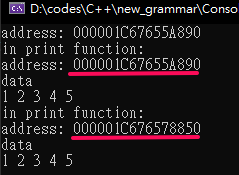
You can directly see that the data addresses of the two objects are different. Therefore, no matter how the data changes, it does not affect the data content inside the other object.
Shallow Copy
This example will demonstrate the problem of shallow copy, which is resource double deletion.
1
2
3
4
5
6
7
8
9
10
11
12
13
14
15
16
17
18
19
20
21
22
23
24
25
26
27
28
29
30
31
32
33
34
35
36
37
38
39
40
41
42
43
44
45
46
47
48
49
#include <iostream>
#include <cstring>

class ShallowCopy
{
private:
    int* data;
    int len;
public:
    ShallowCopy(int len)
    {
        auto data = new int[len] {1, 2, 3, 4, 5};
        std::cout << "address: " << data << std::endl;
        std::cout << data << std::endl;
        this->data = data;
        this->len = len;
    }
    void print()
    {
        std::cout << "in print function: " << std::endl;
        std::cout << "address: " << data << std::endl;
        std::cout << "data " << std::endl;
        if (data != nullptr)
        {
            for (size_t i = 0; i < len; i++)
            {
                std::cout << data[i] << " ";
            }
        }
        std::cout << std::endl;
    }

    ~ShallowCopy()
    {
        delete[] data;
    }
};

int main()
{

    ShallowCopy sc(5);
    sc.print();
    ShallowCopy sc2 = sc;
    sc2.print();

    return 0;
}
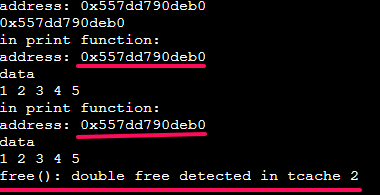
Because the data inside both objects points to the same location, when the object goes out of scope and is recycled, calling the destructor will cause the memory at that location to be deleted twice.
1
2
3
4
~ShallowCopy()
    {
        delete[] data;
    }
BTW, if an object does not explicitly define a copy constructor, the default is a shallow copy. This is particularly noteworthy.
std::move
Finally, std::move enters the stage.
1
2
3
4
5
6
7
8
9
10
11
12
13
14
15
16
17
18
19
20
21
22
23
24
25
26
27
28
29
30
31
32
33
34
35
36
37
38
39
40
41
42
43
44
45
46
47
48
49
50
51
52
53
54
55
#include <iostream>
#include <cstring>

class ShallowCopy
{
private:
    int* data;
    int len;
public:
    ShallowCopy(int len)
    {
        auto data = new int[len] {1, 2, 3, 4, 5};
        std::cout << "address: " << data << std::endl;
        std::cout << data << std::endl;
        this->data = data;
        this->len = len;
    }
    void print()
    {
        std::cout << "in print function: " << std::endl;
        std::cout << "address: " << data << std::endl;
        std::cout << "data " << std::endl;
        if (data != nullptr)
        {
            for (size_t i = 0; i < len; i++)
            {
                std::cout << data[i] << " ";
            }
        }
        std::cout << std::endl;
    }

    ShallowCopy(ShallowCopy&& other) noexcept : data(other.data), len(other.len) {
        other.data = nullptr;
        other.len = 0;
        std::cout << "Moved" << std::endl;
    }

    ~ShallowCopy()
    {
        delete[] data;
    }
};

int main()
{

    ShallowCopy sc(5);
    sc.print();
    ShallowCopy sc2 = std::move(sc);
    sc2.print();

    return 0;
}
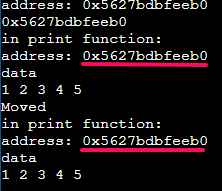
The problem of resource double deletion disappears.
Conclusion:
- Shallow copy can lead to resource double deletion issues.
- Deep copy avoids resource double deletion issues but may have performance bottlenecks.
- Move semantics avoid the resource double deletion problem of shallow copy and the performance bottleneck of deep copy by transferring resources.
Using Shallow Copy & Deep Copy -> You must implement the copy constructor. The syntax is:
1
MyClass(const MyClass& other) {...your code...}
If not explicitly implemented -> the default is shallow copy.
Using std::move -> You must implement the move constructor. The syntax is:
1
MyClass(const MyClass&& other) {...your code...}
You can copy the above code and run it yourself to get a better understanding.
Alright, finally done.