
Lambda expression
Do you find naming functions troublesome? So do I! Haha. Sometimes, just to calculate an average, not writing a function looks messy, but writing a function requires thinking of a name. In C++, you even have to declare it in the header and implement it in the cpp file, which is really annoying!
In C++11, Lambda expressions are usually used in situations where temporary function objects are needed. They are particularly useful for handling STL algorithms, event handling, and callback functions!
Basic Syntax
The basic syntax of a lambda expression is as follows
1
[capture](parameters) -> return_type { body }
capture: Specifies which variables (and how) can be used in the lambda expression.parameters: The parameter list of the lambda expression, similar to that of ordinary functions.return_type: Optional return type. If the return type can be deduced, it can be omitted.body: The function body.
1 Simple Lambda Expression
1
2
3
4
5
6
7
8
9
10
11
12
#include <iostream>

int main() {
    auto add = [](int a, int b) -> int {
        return a + b;
    };

    int result = add(5, 3);
    std::cout << "5 + 3 = " << result << std::endl;

    return 0;
}
In this example, add is a lambda expression that takes two integers and returns their sum.
Omitting the Return Type Modify the above example to demonstrate omitting the return_type.
1
2
3
4
5
6
7
8
9
10
11
12
13
14

#include <iostream>

int main() {
    auto add = [](int a, int b){
        return a + b;
    };

    int result = add(5, 3);
    std::cout << "5 + 3 = " << result << std::endl;

    return 0;
}
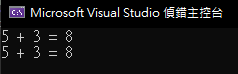
Both examples produce the same output.
2 Capturing Variables
In this case, the parameter list is not needed because variables are captured.
1
2
3
4
5
6
7
8
9
10
11
12
13
14
#include <iostream>

int main() {
    int x = 10;
    int y = 20;

    auto addXY = [x, y]() -> int {
        return x + y;
    };

    std::cout << "x + y = " << addXY() << std::endl;

    return 0;
}
Similarly, if the return type can be deduced, it can be omitted.
1
2
3
4
5
6
7
8
9
10
11
12
13
14
#include <iostream>

int main() {
    int x = 10;
    int y = 20;

    auto addXY = [x, y](){
        return x + y;
    };

    std::cout << "x + y = " << addXY() << std::endl;

    return 0;
}
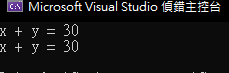
Both examples produce the same output.
3 Using Lambda Expressions in STL Algorithms
1
2
3
4
5
6
7
8
9
10
11
12
13
14
15
16
17
18
19
20
21
22
23
24
25
26
#include <iostream>
#include <vector>
#include <algorithm>

int main() {
    std::vector<int> numbers = {101, 102, 103, 104, 105};

    std::for_each(numbers.begin(), numbers.end(), [](int n) {
        std::cout << n << " ";
    });


    std::cout << std::endl;

    // sort by descending order
    std::sort(numbers.begin(), numbers.end(), [](int a, int b) {
        return b < a;
    });

    std::for_each(numbers.begin(), numbers.end(), [](int n) {
        std::cout << n << " ";
    });

    return 0;
}
The output is as follows 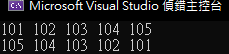
In this example, lambda expressions are used as callback functions for std::for_each and std::sort. The first lambda expression is used to output each element in the vector, and the second lambda expression is used to sort the vector in descending order.
Use Cases
- STL Algorithms: Lambda expressions are particularly convenient in scenarios that require callback functions, such as
std::for_each,std::sort, andstd::transform. - Event Handling: Such as callback functions in GUI programming.
- Temporary Small Functions: When you need a simple small function but do not want to name it.
- Parallel and Asynchronous Programming: Lambda expressions can be submitted as tasks or callbacks when using parallel libraries or asynchronous programming.
Thank you for reading until the end!