
捕捉變數
Let’s review the content from the previous articlebefore diving deeper.
The basic syntax of a Lambda expression is as follows:
1
[capture](parameters) -> return_type { body }
If I have too many variables to capture and need to specify each one individually, the lambda function will become very messy. Is there a more elegant way to achieve this?
Yes!!
The Meaning of Capture Mode [=]
[=] indicates capture by value. This means that the Lambda expression will copy all the variables used from the outer scope. Inside the Lambda expression, these variables’ values are copies of the original variables and are read-only; they cannot be assigned new values.
1
2
3
4
5
6
7
8
9
10
11
12
13
14
15
16
#include <iostream>

int main() {
    int x = 8;
    int y = 24;

    auto lambda = [=]() {
        // Captures copies of x and y
        std::cout << "x: " << x << ", y: " << y << std::endl;
    };

    // Calls the Lambda expression
    lambda();

    return 0;
}
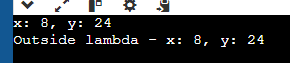
Execution result:
Assign value to x,y in lambda function
1
2
3
4
5
6
7
8
9
auto lambda = [=]() {
    // Captures copies of x and y
    std::cout << "x: " << x << ", y: " << y << std::endl;

    // Modifies copies of x and y
    // Note: These modifications do not affect the external x and y
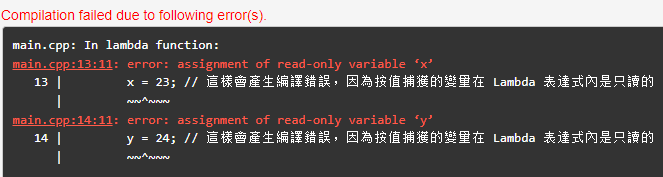
    x = 23; // This will cause a compile error because variables captured by value are read-only inside the Lambda expression
    y = 24; // This will cause a compile error because variables captured by value are read-only inside the Lambda expression
};
Error:
The Meaning of Capture Mode [&]
Capture mode [&] indicates capture by reference. This means that the variables used inside the Lambda expression are references to the external variables, so modifications to these variables will directly affect the original variables in the outer scope.
1
2
3
4
5
6
7
8
9
10
11
12
13
14
15
16
17
18
19
20
21
22
23
#include <iostream>

int main() {
    int x = 8;
    int y = 24;

    auto lambda = [&]() {

        std::cout << "x: " << x << ", y: " << y << std::endl;

        x = 81;
        y = 81;
    };


    lambda();


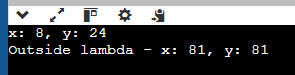
    std::cout << "Outside lambda - x: " << x << ", y: " << y << std::endl;

    return 0;
}
After calling lambda(), both x and y are changed.
Of course, you can specify which variables to capture by value = and which to capture by reference &. If nothing is specified, the default is capture by value =, as with the variable x below:
1
 auto lambda = [x, &y]() {};
That’s it. Give it a try! Happy coding.