
fastapi + 前端 + 資料庫串接
我們接下來要完成以下的串接

由於這次前後端的 code 比較長,這邊先講遇到的問題, 避免看完 code 後,暈頭轉向。
錯誤訊息
fastapi.exceptions.FastAPIError: Invalid args for response field! Hint: check that class 'item_to_db.Item' is a valid Pydantic field type. If you are using a return type annotation that is not a valid Pydantic field (e.g. Union[Response, dict, None]) you can disable generating the response model from the type annotation with the path operation decorator parameter response_model=None.
相信很多人會遇到這個的錯誤。 此錯誤是因為 FastAPI 的路由函數返回了 SQLAlchemy 的 ORM 模型,但 FastAPI 期望的是 Pydantic 模型。要解決這個問題,我們需要使用 Pydantic 模型來定義我們的數據結構並用於數據驗證和返回響應。
簡單的說,就是你拿與資料庫互動的資料結構,想要硬塞給前端使用。
解法如下:
創建 ORM 模型 和 Pydantic 模型, 並且讓這兩個模型可以互相轉換。
ORM 模型
1
2
3
4
5
6
7
# 定義資料庫模型
class Item(Base):
    __tablename__ = 'items'

    id = Column(Integer, primary_key=True, index=True)
    name = Column(String, index=True)
    description = Column(String, index=True)
Pydantic 模型
1
2
3
4
5
6
7
8
9
10
11
12
13
# 定義 Pydantic 模型
class ItemCreate(BaseModel):
    id:int
    name: str
    description: str

class ItemRead(BaseModel):
    id: int
    name: str
    description: str

    class Config:
        orm_mode = True
以下我們仔細分析一下這個創建 Item 的函式
1
2
3
4
5
6
7
8
# 創建新項目
@app.post("/items/", response_model=ItemRead)
def create_item(item: ItemCreate, db: Session = Depends(get_db)):
    db_item = Item(id=item.id, name=item.name, description=item.description)
    db.add(db_item)
    db.commit()
    db.refresh(db_item)
    return db_item
response_model=ItemRead 指定了這個路由的響應模型為 ItemRead,這意味著當函數執行完成後,返回的數據將會被轉換為 ItemRead 對象並返回給用戶,也就是 Pydantic 模型。
db_item = Item(id=item.id, name=item.name, description=item.description): 在這裡,我們根據用戶提交的數據 item 創建了一個新的 Item 對象 db_item。我們使用了 ItemCreate 模型中的 id、name 和 description 屬性來初始化這個對象。 也就是自己必須寫邏輯將 Pydantic 模型轉成 ORM 模型,以便後續跟資料庫作互動。
Fastapi codes
1
2
3
4
5
6
7
8
9
10
11
12
13
14
15
16
17
18
19
20
21
22
23
24
25
26
27
28
29
30
31
32
33
34
35
36
37
38
39
40
41
42
43
44
45
46
47
48
49
50
51
52
53
54
55
56
57
58
59
60
61
62
63
64
65
66
67
68
69
70
71
72
73
74
75
76
77
78
79
80
81
82
83
84
85
86
87
88
89
90
91
92
93
94
95
96
97
98
99
100
101
102
103
104
105
106
107
108
109
110
111
112
113
114
115
116
117
# frontend <-> backend <-> database

from typing import List
from fastapi import FastAPI, Depends, HTTPException
from fastapi.middleware.cors import CORSMiddleware
from sqlalchemy import create_engine, Column, Integer, String
from sqlalchemy.ext.declarative import declarative_base
from sqlalchemy.orm import sessionmaker, Session
from pydantic import BaseModel


# 設置資料庫連接
DATABASE_URL = 'postgresql://myuser:mypassword@172.17.0.2:5432/mydatabase'
engine = create_engine(DATABASE_URL, echo=True)
SessionLocal = sessionmaker(autocommit=False, autoflush=False, bind=engine)
Base = declarative_base()


# 定義資料庫模型
class Item(Base):
    __tablename__ = 'items'

    id = Column(Integer, primary_key=True, index=True)
    name = Column(String, index=True)
    description = Column(String, index=True)

# 創建資料庫表
Base.metadata.create_all(bind=engine)

# 定義 Pydantic 模型
class ItemCreate(BaseModel):
    id:int
    name: str
    description: str

class ItemRead(BaseModel):
    id: int
    name: str
    description: str

    class Config:
        orm_mode = True

# 創建 FastAPI 應用
app = FastAPI()


# 配置 CORS 中間件
app.add_middleware(
    CORSMiddleware,
    allow_origins=["http://localhost"],  # 允許的來源
    allow_credentials=True,
    allow_methods=["*"],
    allow_headers=["*"],
)

# 依賴項 - 獲取資料庫會話
def get_db():
    db = SessionLocal()
    try:
        yield db
    finally:
        db.close()

# 創建新項目
@app.post("/items/", response_model=ItemRead)
def create_item(item: ItemCreate, db: Session = Depends(get_db)):
    db_item = Item(id=item.id, name=item.name, description=item.description)
    db.add(db_item)
    db.commit()
    db.refresh(db_item)
    return db_item

# 讀取項目
@app.get("/items/{item_id}", response_model=ItemRead)
def read_item(item_id: int, db: Session = Depends(get_db)):
    item = db.query(Item).filter(Item.id == item_id).first()
    if item is None:
        raise HTTPException(status_code=404, detail="Item not found")
    return item

# 更新項目
@app.put("/items/{item_id}", response_model=ItemRead)
def update_item(item_id: int, updated_item: ItemCreate, db: Session = Depends(get_db)):
    item = db.query(Item).filter(Item.id == item_id).first()
    if item is None:
        raise HTTPException(status_code=404, detail="Item not found")

    item.name = updated_item.name
    item.description = updated_item.description
    db.commit()
    db.refresh(item)
    return item

# 刪除項目
@app.delete("/items/{item_id}", response_model=dict)
def delete_item(item_id: int, db: Session = Depends(get_db)):
    item = db.query(Item).filter(Item.id == item_id).first()
    if item is None:
        raise HTTPException(status_code=404, detail="Item not found")

    db.delete(item)
    db.commit()
    return {"detail": "Item deleted"}

# 刪除所有項目
@app.delete("/items/", response_model=dict)
def delete_all_items(db: Session = Depends(get_db)):
    db.query(Item).delete()
    db.commit()
    return {"detail": "All items deleted"}

# 獲取所有項目
@app.get("/items/", response_model=List[ItemRead])
def get_all_items(db: Session = Depends(get_db)):
    items = db.query(Item).all()
    return items
html
1
2
3
4
5
6
7
8
9
10
11
12
13
14
15
16
17
18
19
20
21
22
23
24
25
26
27
28
29
30
31
32
33
34
35
36
37
38
39
40
41
42
43
44
45
46
47
48
49
50
51
52
53
54
55
56
57
58
59
60
61
62
63
64
65
66
67
68
69
70
71
72
73
74
75
76
77
78
79
80
81
82
83
84
85
86
87
88
89
90
91
92
93
94
95
96
97
98
99
100
101
102
103
104
105
106
107
108
109
110
111
112
113
114
115
116
117
118
119
120
121
122
123
124
125
126
127
128
129
130
131
<!DOCTYPE html>
<html>
<head>
    <title>FastAPI CRUD Operations</title>
    <script>

        const baseURL = 'http://localhost:8000';

        async function createItem() {
            const id = document.getElementById('create-id').value;
            const name = document.getElementById('create-name').value;
            const description = document.getElementById('create-description').value;

            const response = await fetch(`${baseURL}/items/`, {
                method: 'POST',
                headers: { 'Content-Type': 'application/json' },
                body: JSON.stringify({ id: parseInt(id), name: name, description: description })
            });
            const result = await response.json();
            alert(JSON.stringify(result));
        }

        async function readItem() {
            const id = document.getElementById('read-id').value;
            const response = await fetch(`${baseURL}/items/${id}`, { method: 'GET' });
            const result = await response.json();
            alert(JSON.stringify(result));
        }

        async function updateItem() {
            const id = document.getElementById('update-id').value;
            const name = document.getElementById('update-name').value;
            const description = document.getElementById('update-description').value;

            const response = await fetch(`${baseURL}/items/${id}`, {
                method: 'PUT',
                headers: { 'Content-Type': 'application/json' },
                body: JSON.stringify({ id: parseInt(id), name: name, description: description })
            });
            const result = await response.json();
            alert(JSON.stringify(result));
        }

        async function deleteItem() {
            const id = document.getElementById('delete-id').value;
            const response = await fetch(`${baseURL}/items/${id}`, { method: 'DELETE' });
            const result = await response.json();
            alert(JSON.stringify(result));
        }

        async function deleteAllItem() {
            try {
                const response = await fetch(`${baseURL}/items/`, {
                    method: 'DELETE',
                    headers: {
                        'Content-Type': 'application/json'
                    }
                });

                if (!response.ok) {
                    throw new Error('Network response was not ok');
                }

                const result = await response.json();
                alert(JSON.stringify(result));
            } catch (error) {
                console.error('Error:', error);
                alert('An error occurred while deleting all items.');
            }
        }

        async function getAllItems() {
            try {
                const response = await fetch(`${baseURL}/items/`);

                if (!response.ok) {
                    throw new Error('Network response was not ok');
                }

                const items = await response.json();
                const itemsList = document.getElementById('itemsList');

                items.forEach(item => {
                    const li = document.createElement('li');
                    li.textContent = `${item.id}: ${item.name} - ${item.description}`;
                    itemsList.appendChild(li);
                });
            } catch (error) {
                console.error('Error:', error);
                alert('An error occurred while getting items.');
            }
        }

        window.addEventListener('load', getAllItems);

    </script>
</head>
<body>
    <h1>FastAPI CRUD Operations</h1>

    <h1>All Items</h1>
    <ul id="itemsList"></ul>

    <h2>Create Item</h2>
    <label>ID:</label><input type="text" id="create-id"><br>
    <label>Name:</label><input type="text" id="create-name"><br>
    <label>Description:</label><input type="text" id="create-description"><br>
    <button onclick="createItem()">Create</button><br>

    <h2>Read Item</h2>
    <label>ID:</label><input type="text" id="read-id"><br>
    <button onclick="readItem()">Read</button><br>

    <h2>Update Item</h2>
    <label>ID:</label><input type="text" id="update-id"><br>
    <label>Name:</label><input type="text" id="update-name"><br>
    <label>Description:</label><input type="text" id="update-description"><br>
    <button onclick="updateItem()">Update</button><br>

    <h2>Delete Item</h2>
    <label>ID:</label><input type="text" id="delete-id"><br>
    <button onclick="deleteItem()">Delete</button><br>

    <h2>Delete All Items</h2>
    <button onclick="deleteAllItem()">Delete</button><br>


</body>
</html>
雖然 code 很長,但其實遇到的問題不多,就是前端只能吃 Pydantic 模型 資料庫只能吃 SQLAlchemy 的 ORM 模型,要記得做轉換。
操作示範
因篇幅有限,所以操作示範的篇幅少一點。
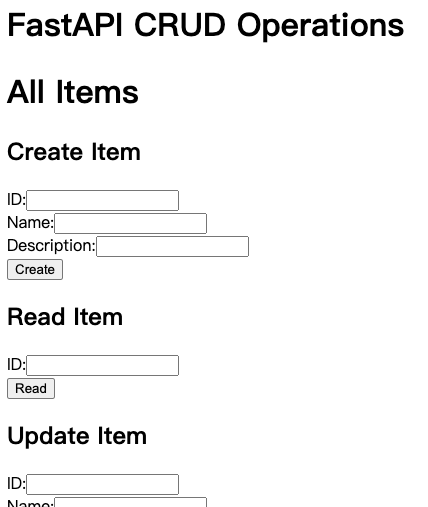
Web page just looks like following
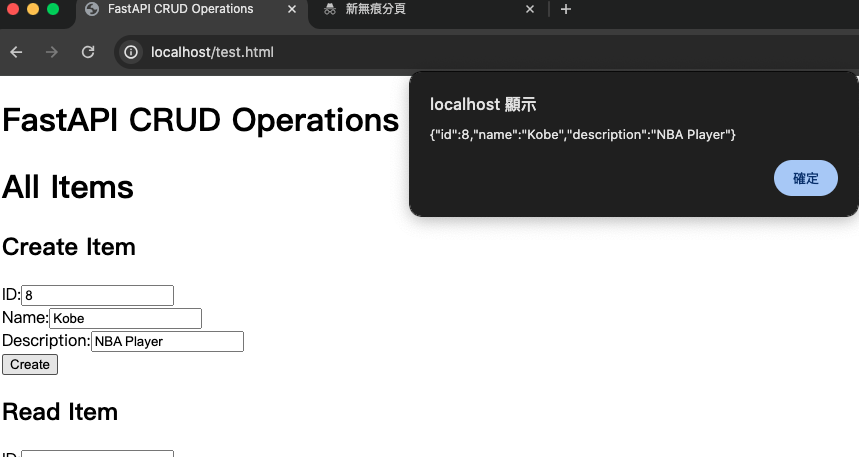
新增一個 item
更新該 item 資訊
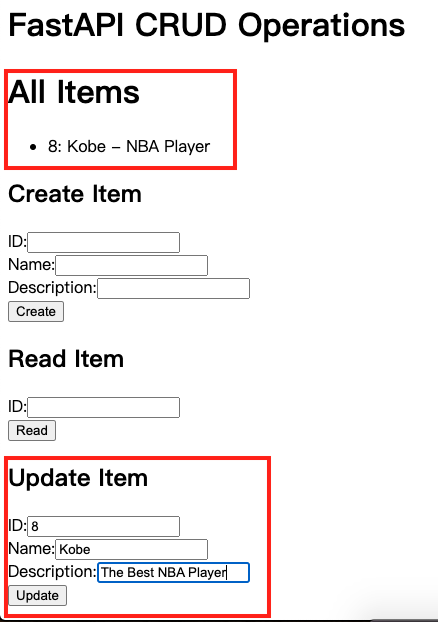
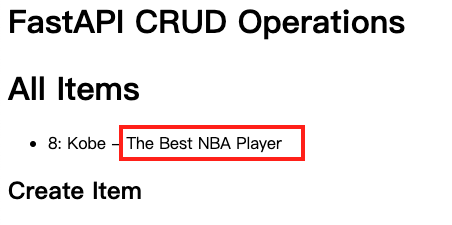
OK, Done !!!