Leaflet 介紹
Leaflet 是一個開源的 JavaScript 地圖庫,旨在為網頁和移動應用提供交互式地圖的展示功能。它簡單輕量,易於使用,並且具有豐富的自定義選項。Leaflet 不僅支援基本的地圖顯示,還可以添加標記、多邊形、線條、圖層切換等功能。 Leaflet link
code 示範
以下的 code 複製直接可 run (當然要有 web server, like nginx or tomcat..etc)
1
2
3
4
5
6
7
8
9
10
11
12
13
14
15
16
17
18
19
20
21
22
23
24
25
26
27
28
<!DOCTYPE html>
<html>
<head>
<link rel="stylesheet" href="https://unpkg.com/leaflet@1.7.1/dist/leaflet.css" />
<script src="https://unpkg.com/leaflet@1.7.1/dist/leaflet.js"></script>
<title>Page Title</title>
</head>
<body>
<div id="map" style="width: 600px; height: 400px;"></div>
<script>
var map = L.map('map').setView([25.0330, 121.5654], 10);
L.tileLayer('https://{s}.tile.openstreetmap.org/{z}/{x}/{y}.png', {
attribution: 'Map data © <a href="https://www.openstreetmap.org/copyright">OpenStreetMap</a> contributors'
}).addTo(map);
L.marker([25.0330, 121.5654]).addTo(map)
.bindPopup('Taipei 101')
.openPopup();
</script>
</body>
</html>
code 解說
<link rel="stylesheet" href="https://unpkg.com/leaflet@1.7.1/dist/leaflet.css" />-> 引入 Leaflet CSS 文件<script src="https://unpkg.com/leaflet@1.7.1/dist/leaflet.js"></script>-> 引入 Leaflet JavaScript 文件var map = L.map('map').setView([25.0330, 121.5654], 10);-> 創建地圖對象並設置初始的 viewL.tileLayer('https://{s}.tile.openstreetmap.org/{z}/{x}/{y}.png',-> 添加地圖圖層 (如 OpenStreetMap)L.marker([25.0330, 121.5654]).addTo(map) .bindPopup('Taipei 101') .openPopup();-> 在地圖上添加標記
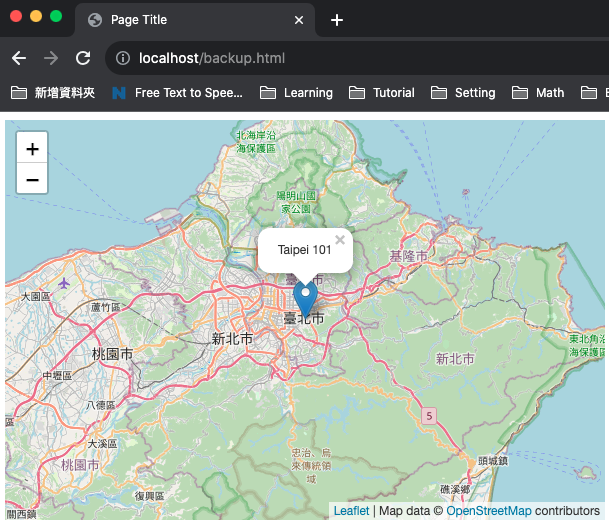
執行結果
約 30 行的 codes, 就可以顯示出地圖了,簡單吧