

多國語言
當你辛辛苦苦寫了一個服務或是 App, 理所當然的希望越多人用越好,這時候可以動態切換文字顯示的語言就顯得十分重要。
當你的前端 UI 使用 Vue 實現,就可以使用 vue-i18n 這個方便的插件。
Vue I18n 是 Vue.js 的國際化插件,主要用來為 Vue 應用程式提供多語言支持。它簡化了應用程式中的語言切換,並提供了動態加載語言資源的功能
主要功能
多語言支持: Vue I18n 能夠讓應用程式在多種語言間切換,適合需要支持不同語言的應用程式。
訊息格式化: 允許通過語言包或翻譯文件來格式化訊息。可以使用佔位符和變量來動態更新訊息內容。
數字與日期格式化: 可以根據本地語言規則格式化數字和日期,並根據用戶的語言自動應用正確的格式。
動態語言切換: 通過 Vue I18n,應用可以在運行時動態地更改語言,無需重新加載頁面。
與 Vue Router、Vuex 結合: Vue I18n 可以輕鬆與 Vue 的其他生態系統,如 Vue Router 和 Vuex 結合使用,確保整個應用的語言保持一致。
code
以下寫一個選單切換語言
1
2
3
4
5
6
7
8
9
10
11
12
13
14
15
16
17
18
19
20
21
22
23
24
25
26
27
28
29
30
31
32
33
34
35
36
37
38
39
40
41
42
43
44
45
46
47
48
49
50
51
52
53
54
55
56
57
58
59
60
61
62
63
<!DOCTYPE html>
<html lang="en">
<head>
  <meta charset="UTF-8">
  <meta name="viewport" content="width=device-width, initial-scale=1.0">
  <title>Vue i18n Example</title>
  <script src="https://unpkg.com/vue@3/dist/vue.global.js"></script>
  <script src="https://cdnjs.cloudflare.com/ajax/libs/vue-i18n/10.0.1/vue-i18n.global.min.js"></script>
</head>
<body>
  <div id="app">
    <h1></h1>
    <p></p>

    <!-- 語言切換 -->
    <select v-model="currentLocale" @change="changeLanguage">
      <option value="en">English</option>
      <option value="zh-TW">繁體中文</option>
    </select>
  </div>

  <script>
    const { createApp } = Vue;
    const { createI18n } = VueI18n;

    // 語言包
    const messages = {
      en: {
        greeting: 'Hello',
        farewell: 'Goodbye'
      },
      'zh-TW': {
        greeting: '你好',
        farewell: '再見'
      }
    };

    // i18n 配置
    const i18n = createI18n({
      locale: 'en', // 設定預設語言
      fallbackLocale: 'en', // 備援語言
      messages
    });

    // Vue 應用
    const app = createApp({
      data() {
        return {
          currentLocale: 'en'
        };
      },
      methods: {
        changeLanguage() {
          i18n.global.locale = this.currentLocale; // 更新語言
        }
      }
    });

    app.use(i18n);
    app.mount('#app');
  </script>
</body>
</html>
執行結果
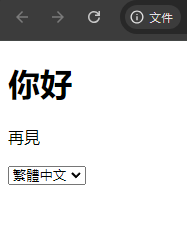
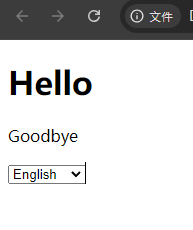
切換語言: 可以通過 i18n.global.locale 改變語言:
1
i18n.global.locale = 'zh-TW';
很簡單吧!試試看!